Unity vs Unreal Engine: Which Should Your Project Use?
 By Miheer Jasani
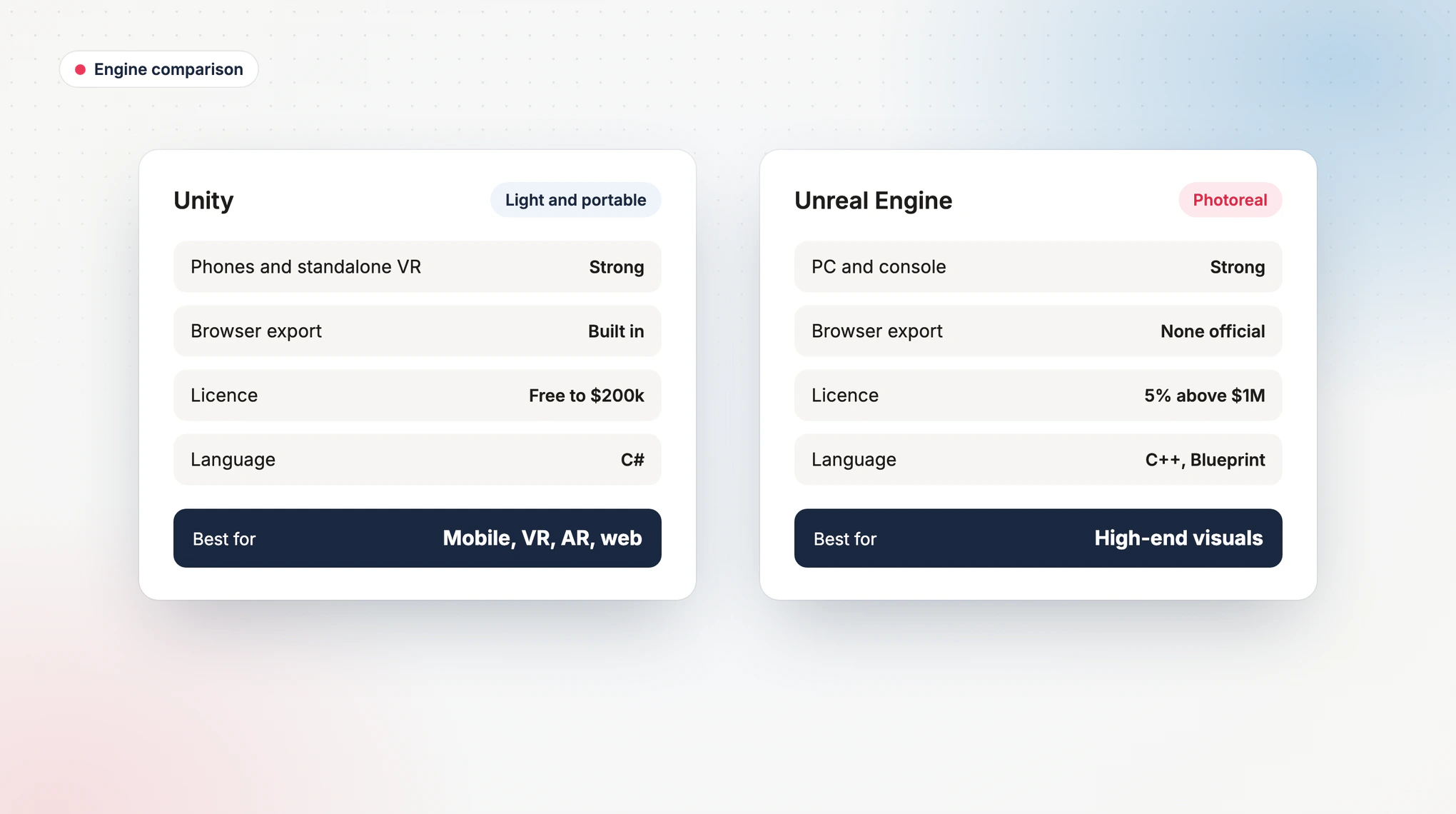
Choose Unity for mobile games, standalone VR, AR and anything that must run in a web browser; choose Unreal Engine for photorealistic PC and console games, film-quality visualisation and large high-end worlds. Both engines are free to start, both are used by successful studios, and for most business projects the deciding factors are the target device, the visual quality you need and the experience of the team building it.
This guide compares the two engines from the point of view of the person funding the project: licensing and cost, platforms, visual quality, hiring, and the situations where each one is the clear choice. For a wider look at the tools around the engine, see our guide to VR development tools.
Unity is usually the better fit for: mobile games, standalone VR headsets, AR apps, browser-based 3D and projects that need to run on low-cost devices.
Unreal is usually the better fit for: photorealistic PC and console games, architectural and automotive visualisation, virtual production and large open worlds.
Licensing: both are free to start. Unreal charges a 5% royalty on game revenue above $1M. Unity Personal is free up to $200,000 in revenue and funding, with paid plans above that.
Biggest factor: the team's experience with the engine usually affects cost and quality more than the engine itself.
1. Unity and Unreal Compared
| Factor | Unity | Unreal Engine |
|---|---|---|
| Strongest platforms | Mobile, standalone VR, AR, browser, PC | PC, console, high-end VR, visualisation |
| Visual quality out of the box | Very good, scales down well to low-power devices | Excellent, built for photorealism |
| Performance on phones and standalone headsets | Strong, small builds and fast load times | Capable, but heavier builds and more tuning |
| Web browser export | Built in | No official browser export |
| Programming | C# | C++ and Blueprint visual scripting |
| Licensing | Free tier up to $200,000 revenue and funding, then paid seats | Free to start, 5% royalty on game revenue above $1M |
| Typical team availability | Large pool of mobile and XR developers | Strong pool for PC, console and visualisation |
2. Licensing and Cost
Engine licences are rarely the biggest cost in a project, but they shape long-term economics, especially for successful games.
- Unreal Engine is free to use until a game or application earns $1M in lifetime gross revenue. Above that, a 5% royalty applies to revenue attributable to that product. Non-game commercial users above $1M in annual revenue pay per seat instead.
- Unity charges per seat rather than a revenue share. Unity Personal is free for organisations with up to $200,000 in revenue and funding, and larger organisations buy paid seats for each developer.
For a business app, training simulator or marketing experience that earns no direct revenue, neither model adds much to the budget. For a hit game, a royalty and a seat licence play out very differently, so model both before you commit.
Fact check: Unreal Engine applies a 5% royalty to all lifetime gross revenue above $1M directly attributable to a product, with Epic Games Store sales royalty-free. Unity cancelled its proposed Runtime Fee on 12 September 2024 and raised the Unity Personal ceiling to $200,000 in revenue and funding.
Sources: Epic Games, Unreal Engine licensing and Unity, pricing updates
3. When Unity Is the Better Choice
- Mobile games and apps: small download sizes and smooth performance on mid-range phones matter more than cinematic lighting.
- Standalone VR headsets: headsets with mobile processors reward an engine that stays light, which is why Unity is a common choice for VR training and VR games on standalone devices.
- AR and mixed reality: mature toolkits for phone AR and headset passthrough.
- Browser delivery: Unity can export to the web, so the same project can run in a browser and in a headset. This is how our VidyaXR learning modules work.
- Fast iteration on a moderate budget: a large pool of experienced developers keeps hiring and rates manageable.
4. When Unreal Engine Is the Better Choice
- Photorealistic visuals: realistic lighting and very detailed geometry for premium PC and console games.
- Architectural and automotive visualisation: lifelike materials and lighting for walkthroughs and configurators shown on capable hardware.
- Virtual production and film: real-time rendering for sets, previews and cinematics.
- Large open worlds: tools built for streaming huge, detailed environments.
5. When the Engine Is the Wrong Question
Some projects need neither. A simple 3D product viewer on a website is often better built with lightweight web 3D libraries, because it loads faster than any game engine export. A business app with forms and dashboards needs a mobile or web framework, not a game engine. And for most projects, a team with five years of experience in one engine will deliver a better result in that engine than in the "theoretically better" one.
Start from the device your users have. If it is a phone, a standalone headset or a browser, Unity is the safer default. If it is a gaming PC, a console or a high-end display wall and photorealism is the point, choose Unreal. Then choose a team with shipped projects in that engine and ask to see them running on the target device.
6. Frequently Asked Questions
Is Unity or Unreal better for VR?
For standalone headsets, Unity is the more common choice because it stays light on mobile processors. For PC VR with photorealistic visuals, Unreal is a strong option.
Is Unreal Engine free for commercial use?
Yes, until a game or application earns $1M in lifetime gross revenue. Above that, a 5% royalty applies to game revenue, or a per-seat fee for some non-game commercial uses.
Which engine is cheaper to develop with?
For mobile, VR and AR projects, Unity projects are usually cheaper because of the larger developer pool and lighter optimisation work. For high-end PC visuals, Unreal can be cheaper because more is available out of the box.
Can we switch engines later?
Not easily. Code, scenes and many assets must be rebuilt, although 3D models and textures can usually be reused. Choose carefully at the start.
Which engine is better for mobile games?
Unity, for most mobile games. Smaller builds and broad device support matter more on phones than maximum visual fidelity. Our game development cost guide covers mobile budgets.
Build on the Right Engine From Day One
MEPROTECH builds in Unity 6 for mobile, VR and the browser: our VidyaXR modules run in a browser and inside a headset from the same project, and we publish our own games on Google Play and Meta Quest. We recommend the engine that fits your users and devices, and explain the trade-offs before you commit.
Explore our game development services and AR and VR development, or book a free call to choose the right engine.